Showing posts with label SOCIAL. Show all posts

Tuesday, April 26, 2016

WhatsApp has turned on end-to-end encryption across all users

The Facebook-owned app, which has more than one billion monthly active users, turned on the Signal Protocol, developed by Open Whisper Systems, by default. The open-source private messaging system, which has been supported by Edward Snowden, will protect group chats, attachments, voice notes, and voice calls that are made across WhatsApp on Android, iPhone, Windows devices and some Nokia and BlackBerry models.

The encryption method lets users see content that has been sent but does not allow service providers, such as WhatsApp, to access the content of the messages.
"Starting today, users will see a notice in their conversation screen as their individual and group chats become end to end encrypted," Open Whisper Systems said in a blog post. "Additionally, the encryption status of any chat is visible under that chat's preferences screen."

WhatApp's adoption of end-to-end encryption follows Apple's debate with the FBI over the unlocking of a terrorist's iPhone. During the dispute Jan Koum, WhatsApps' co-founder, said that he supported Apple's position and admired its "efforts to protect user data". In March it was revealed that WhatsApp had been targeted by court orders asking to access information it holds.

The Whisper blog explained that there would still be unencrypted text on the WhatsApp network until everyone updated to the latest version of the software. When someone is using the end-to-end encrypted network plain text will not be sent to them, even if they downgrade their software.

"Eventually all the pre-e2e capable clients will expire, at which point new versions of the software will no longer transmit or accept plaintext messages at all," Whisper said.
Users will also be able to verify their encrypted messages by scanning a QR code or reading a code aloud. This is to ensure messages are being sent and received by the correct users. The latest move means that WhatsApp employees won't be able to access messages, even if they are ordered to do so by the courts.


According to reports, a team of 15 engineers from the company was involved in bringing end-to-end encryption to all WhatsApp users; and creating the fully-encrypted service didn't come without its challenges. Koum told that the project had been in the works since 2014, with development nearly publicly announced in 2015 only for cross-platform compatibility problems to cause delays.

Source: http://www.wired.co.uk

Thursday, August 9, 2012

Sunday, June 10, 2012

Chit Chat - free Facebook chat instant messenger


Chit Chat is a free Facebook chat instant messenger (IM) that allows you to chat with your Facebook friends from your desktop.


Chit Chat connects to Facebook and removes the need of a web-browser to talk over Facebook Chat.


Fun and Free
 - Convenient and fun way to chat with your Facebook contacts without the hassle of surfing Facebook


Free Your Web-Browser - No need to keep your web browser logged into Facebook


Easy To Use - Download, install and then login with your Facebook username and password - easy!


Popular? - Swift and fast tabbed chat Interface making it easy to talk with many Facebook friends at once


Instant Message Notification - Lets you know when you receive an instant message.


Login to Facebook Chat with our Facebook Messenger


Emoticons


          Chit Chat lets you access Facebook chat from your desktop.


          Our Facebook Messaging software enables you to talk with your  


          Facebook friends  without having to use your web browser. 


  • Your Colour, Text Size and Font


    Emoticons


    Large pink Comic Sans or small blue Tahoma?


    These are just two ways (out of hundreds of choices!) in which you can customize your Facebook messages.

  •  


  • Never Miss A Facebook Message


    Emoticons


  • Chit Chat provides an audio notification when Facebook chat messages are received & when your Facebook friends login or out.

    Both notifications can be disabled if you like!


    Is Amy Online?  


    Emoticons 


    With our popular Facebook Messenger you can see at a glance which of your Facebook friends are online, away or offline


  •  

  •  


  • Hide Those Messages!


    Emoticons


    The boss is checking up on you? Ctrl + M quickly hides our Facebook chat messenger from your screen.


    This is just one of 20+ useful shortcuts.


  •  


    Did I Really Say That?


    Emoticons


    Chit Chat for Facebook can automatically save your Facebook IMs so that you can check back later and see who said what.


  • Never Miss A Mate


    Emoticons


    Your task bar will flash to let you know when a Facebook chat message has been received.


    "Toasts" will appear above your clock to let you know when your Facebook friends have logged in/out.


    Both can be disabled if you prefer!


    Use Facebook Chat At School or Work


  •  

  •  


Emoticons


            Bypass filters with Chit Chat for Facebook, Chit Chat supports proxy servers.


Sunday, April 8, 2012

pinterest: Fast growing Social network tool to improve your Blog, Website traffic


Mashable "Expressing passion for a hobby is just as easy
as browsing for your next purchase. But what’s even more addictive about
the site — a collection of collections — is that it’s just as much
about the users as it is what they’ve posted."


Pinterest is a virtual pinboard type social networking site. You can browse pinboards created by other people to discover new things and get inspiration from people who share your interests.


People use pinboards to plan their weddings, decorate their homes, and share their favorite recipes.


What is a pin?


A pin is an image added to Pinterest. A pin can be added from a website using the Pin It button, or you can upload images from your computer. Each pin added using the Pin It button links back to the site it came from.


 To make Pinterest the most useful to yourself and others, follow best practices when pinning:


Pin from the original source.
Pin from permalinks.
Give credit and include a thoughtful pin description.  


What is the difference between Liking and repinning?


Liking a pin adds the image to your profile’s Likes section; the image does not get added to one of your boards.


Repinning an image allows you to categorize the image onto one of your boards. You can edit the description of a repin. The source-link of an image is saved automatically, no matter how many times it’s repinned.


What is a Pinboard?


A board is a set of pins. A board can be created on any topic, such as Cool Posters, Recipes For Dinner, or Wishlist. You can add as many pins to a board as you want.


What is following?


“Following All” means you'll have all of a user’s pins on all their boards shown to you in real-time on Pinterest. If the user makes new boards, you will automatically follow them.


You can follow individual boards if you're only interested in seeing a user's pins to specific boards.


You can unfollow boards and users at any time: they will not be notified.


To install the “Pin It” button in Firefox:


  1. Display your Bookmarks Bar by clicking View > Toolbars > Bookmarks Toolbar

  2. Drag the “Pin It” button to your Bookmarks Toolbar

  3. When you are browsing the web, push the “Pin It” button to pin an image


Once installed in your browser, the “Pin It” button lets you grab an image from any website and add it to one of your pinboards. When you pin from a website, we automatically grab the source link so we can credit the original creator.


Click to get firefox button


Add the follow button to your website


Download from AppStore


Enhanced by Zemanta


Pinterest: Virtual pinboard to organize and share the beautiful things you find on the web


 pinterest


Pinterest is a virtual pinboard type social networking site. You can browse pinboards created by other people to discover new things and get inspiration from people who share your interests.


People use pinboards to plan their weddings, decorate their homes, and share their favorite recipes.


What is a pin?


A pin is an image added to Pinterest. A pin can be added from a website using the Pin It button, or you can upload images from your computer. Each pin added using the Pin It button links back to the site it came from.


 To make Pinterest the most useful to yourself and others, follow best practices when pinning:


  1. Pin from the original source.

  2. Pin from permalinks.

  3. Give credit and include a thoughtful pin description. 


What is the difference between Liking and repinning?


Liking a pin adds the image to your profile’s Likes section; the image does not get added to one of your boards.


Repinning an image allows you to categorize the image onto one of your boards. You can edit the description of a repin. The source-link of an image is saved automatically, no matter how many times it’s repinned.


What is a Pinboard?


A board is a set of pins. A board can be created on any topic, such as Cool Posters, Recipes For Dinner, or Wishlist. You can add as many pins to a board as you want.


What is following?


“Following All” means you'll have all of a user’s pins on all their boards shown to you in real-time on Pinterest. If the user makes new boards, you will automatically follow them.


You can follow individual boards if you're only interested in seeing a user's pins to specific boards.


You can unfollow boards and users at any time: they will not be notified.


To install the “Pin It” button in Firefox:


  1. Display your Bookmarks Bar by clicking View > Toolbars > Bookmarks Toolbar

  2. Drag the “Pin It” button to your Bookmarks Toolbar

  3. When you are browsing the web, push the “Pin It” button to pin an image


Once installed in your browser, the “Pin It” button lets you grab an image from any website and add it to one of your pinboards. When you pin from a website, we automatically grab the source link so we can credit the original creator.


Click to get firefox button


Add the follow button to your website


Download from AppStore


Thursday, March 29, 2012

Google and Historypin launch online gallery to celebrate The Queen’s Diamond Jubilee


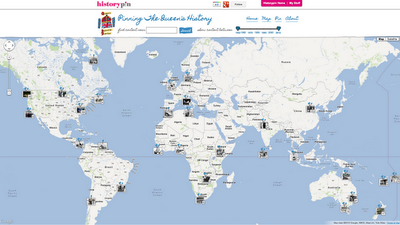
Pinning queens history


Pinning The Queen’s History is a special Collection that acts as a global archive of Her Majesty’s visits and the Silver, Golden and Diamond Jubilee celebrations. It has been created to mark The Queen’s Diamond Jubilee in 2012.


It is a way for users from all over the world and from every generation to share photographs, videos, other materials and memories of The Queen's visits and the Jubilee celebrations from throughout her reign.


Buckingham Palace has already provided a selection of images of items from the Royal Archives, plus there have been contributions from a number of other major archives. Now we’re looking for contributions from individuals and archives.


Throughout her six decades on the throne, The Queen has undertaken hundreds of visits around the United Kingdom and 261 official overseas visits to 116 different countries. Historypin is inviting people from around the world to submit photos, videos and other memories of The Queen during these visits.


So if you've got photos, videos or memories of Her Majesty visiting your town or documenting your own royal celebrations, do add them in here.


We want to get pins in the map for all Her Majesty's visits and Jubilee celebrations, dating back to 1952, when the idea of an online archive like this, contributed to and seen by anyone in the world, would have been completely unimaginable.


Pinning The Queen's History was developed by Historypin, with support from Google. 


Here is what I have pinned:


A collection of photos which took on the occasion of Queen’s visit to MGR Film city, Chennai on the  inauguration of the film ‘Marudhanayagam’ – an unfinished dream venture of Kamal Haassan dated 16th, October, 1997


Queen’s visit to MGR Film city, Chennai


History Pin - Pin your history to the world


Historypin is a way for millions of people to come together, from across different generations, cultures and places, to share small glimpses of the past and to build up the huge story of human history.


Everyone has history to share: whether its sitting in yellowed albums in the attic, collected in piles of crackly tapes, conserved in the 1000s of archives all over the world or passed down in memories and old stories.


Each of these pieces of history finds a home on Historypin, where everyone has the chance to see it, add to it, learn from it, debate it and use it to build up a more complete understanding of the world.


A vibrant Cambridge Market in the 1900's


A vibrant Cambridge Market in the 1900's

and

today with several marquees in place


Cambridge Market


Historypin was created to help people to come together from across different generations, cultures and places, around the history of their families and neighbourhoods, improving personal relations and building stronger communities.


Historypin was founded by Oxford graduate and former teacher Nick Stanhope, CEO of London-based 'We Are What We Do', a non-profit company created in 2010.


Historypin has been developed by the not-for-profit company, in partnership with Google.


Search result for "Bangalore"


Everyone has history to share: whether its sitting in yellowed albums in the attic, collected in piles of crackly tapes, conserved in the 1000s of archives all over the world or passed down in memories and old stories.


Each of these pieces of history finds a home on Historypin, where everyone has the chance to see it, add to it, learn from it, debate it and use it to build up a more complete understanding of the world.


A Closer look


The website is the main focus of the whole operation, alongside it an app has been released for iPhone and Android phones, already downloaded 270,000 times, and several projects to work in communities and schools have been set up.


The app also allows users to add content in a few different ways - to take modern replicas of historical images, capture modern historical moments as they are happening, and scan and upload old images.


MG Road, Bangalore


The local projects take participation directly into neighbourhoods to broad, diverse audiences and facilitates the creation of community collections through outreach, support and lots of local partnerships.


You too can Pin your memories..


It's easy for people to use, all you need to do is Digitise your images, collect information, the more details you can find the better, upload it and pin it.


See what I've pinned on Historypin